

Airtel Money has made it possible for millions of Zambians to buy and sell without ever needing a bank account. Most people use it daily for sending money and paying bills. Far fewer have used it to pay on a website or app, and the process is different enough that it puts people off.
It shouldn't. Paying online with Airtel Money takes about a minute, and as this guide shows, it usually costs you less than sending the same amount to someone's personal number.
What you need before you start
- An active Airtel line with Airtel Money registered
- Enough balance in your wallet to cover the purchase
- Your Airtel Money PIN
No bank account, no card, and no extra app to download. You can check your balance by dialling *115#, which replaced the old *778# code in 2022.
How the payment works, step by step
1. Add your items and go to checkout
Browse the store, add what you want to your cart, and fill in your contact and delivery details as normal.
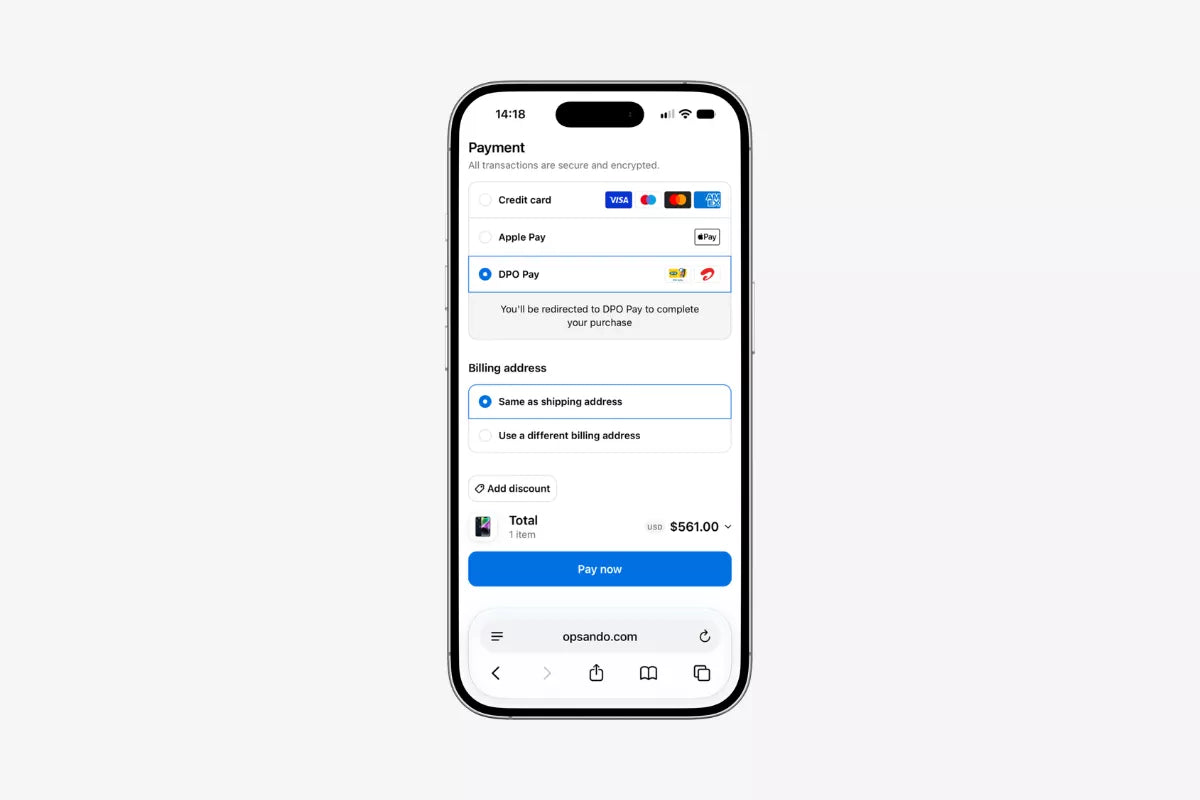
2. Choose your payment method
At the payment step, you may not see Airtel Money listed by name. Many stores display the name of their payment gateway instead, such as DPO Pay. That's normal. It means the store uses a secure third-party platform to process mobile money, and you'll choose Airtel on the next screen.
3. You're redirected to the gateway's payment page
Tapping "Pay now" takes you to the gateway's own page. Before you go further, check two things: the amount, and the merchant name. The merchant name should match the store you're buying from. This is the single easiest way to spot something suspicious before it costs you anything.
4. Enter your phone number
Enter the number registered to your Airtel Money wallet. It has to be that number, not a different one you also use. Submitting it triggers an authorisation request sent to your phone by Airtel.
5. Approve the request
A prompt appears on your handset. Enter your Airtel Money PIN to approve it.
Nobody legitimate will ever ask you for this PIN. Not the store, not the gateway, not someone calling to "help you complete your payment." The PIN is entered on your own phone, in response to a prompt you triggered.
6. Wait for the redirect
Once approved, the payment processes and you're sent back to the store with your order confirmation. You'll also get a message from Airtel Money confirming the transaction. Don't close the browser before the redirect finishes.
What it actually costs
This is the part most people don't know, and it's worth understanding because it can save you real money.
Airtel Money charges different rates depending on what kind of transaction you're making. Sending money to another person is one rate. Paying a registered merchant or bill is another, and it's substantially cheaper.
According to Airtel Zambia's published tariff guide, sending money to another registered Airtel Money user costs on a tiered scale: K3 on amounts between K1 and K100, rising to K25 on amounts between K800 and K1,500, K40 between K1,500 and K3,000, and K80 between K6,000 and K10,000.
Bill and merchant payments run on a completely different scale: K1.00 between K1 and K150, K2.50 between K300 and K600, K3.50 up to K5,000, and K5.00 between K5,000 and K15,000.
Look at what that means in practice. Buying something for K2,000 through a formal merchant checkout attracts a charge of around K3.50. Sending the same K2,000 to a seller's personal number costs you around K40. That's more than ten times the difference, on a single transaction.
And there's a second saving on top of that. Most reputable online stores absorb the merchant fee themselves rather than passing it to you, which means the price you see at checkout is the price that leaves your wallet. When you send money directly to an individual, the sending fee is yours to pay, on top of the agreed price.
So the comparison isn't really "formal checkout versus direct transfer at the same price." It's a fee of zero to you against a fee of K40, for the same purchase.
Tariffs change. Check Airtel's current tariff guide at airtel.co.zm for the rates in force today.
Daily limits
Airtel Money applies daily transaction limits based on your KYC tier. Airtel Zambia's published guide lists a maximum daily transaction amount of K20,000 for Tier 1 and K100,000 for Tier 2.
If you're buying something expensive, this is worth checking before you get to checkout. Upgrading your tier means completing fuller identity verification with Airtel, which you can do at any Airtel shop with your NRC.
Staying safe
Mobile money fraud in Zambia almost always works the same way: someone contacts you, creates urgency, and talks you into approving something or handing over your PIN. The technology is secure. The pressure is what gets people.
A few rules that cover most of it:
Your PIN is never needed by anyone but you. No store, gateway, agent or Airtel employee will ask for it. Anyone who does is trying to rob you.
Only approve prompts you triggered. If a payment request arrives on your phone and you didn't just check out somewhere, decline it. Don't approve it "to cancel it."
Check the merchant name before approving. It's displayed on the gateway page for exactly this reason.
Be suspicious of urgency. "Approve now or you'll lose the order" is a pressure tactic, not a real constraint. A legitimate checkout will let you start again.
Check the website is real before entering anything. Look for https:// in the address bar, and be wary of stores that only exist on social media with no formal checkout at all.
If your payment fails
Most failures come down to one of four things:
- Not enough balance in your wallet
- The wrong phone number entered on the gateway page
- The prompt expired before you approved it
- Your Airtel line is restricted or inactive
Check those and try again. The authorisation prompt has a short time limit, so keep your phone in your hand when you're checking out.
If money left your wallet but your order wasn't confirmed, don't panic and don't pay again. Contact the store's support team with your payment reference number. Gateway transactions are fully logged on both sides, so these are almost always straightforward to trace.
Is it safe to pay with Airtel Money online?
Yes, when you're paying through a legitimate store with a formal checkout.
The security model is genuinely sound. Your PIN is entered on your own phone, in response to a request from Airtel directly. The store never sees it. The gateway never sees it. Nobody can move money out of your wallet without you approving it on your handset.
That's a meaningfully different position from sending money to a stranger's number, where you have no merchant name to verify, no transaction reference tied to an order, and no company to complain to if the goods never arrive.
Common questions
Do I need the Airtel Money app? No. The authorisation prompt comes to your phone regardless. Dial *115# if you want to check your balance first.
Can I pay for someone else's order? Yes, but the number you enter must be the one registered to the wallet you're paying from.
What if I have both Airtel and MTN? Either works, as long as the store accepts it. The process is nearly identical.
Why does the payment page show a different company name? That's the payment gateway. Stores use them to process mobile money securely. What matters is that the merchant name shown on the page matches the store you're buying from.